Almosafer Arabic
Hotel Booking & Pay Later Audit
A structured usability evaluation of the Arabic-language (RTL) hotel room selection, guest details entry, and "Pay Later" checkout flow on almosafer.com/ar, conducted at 1440px desktop resolution against Jakob Nielsen's 10 Usability Heuristics.
Overview & Key Findings
This evaluation examines the complete hotel booking journey on Almosafer's Arabic RTL interface — from room selection through guest details entry to the "Pay Later" checkout — identifying friction points that erode user trust, increase abandonment risk, and reduce booking conversion.
🎯 Evaluation Goals
Almosafer serves a predominantly Arabic-speaking GCC audience for whom hotel booking is a high-commitment, high-consideration decision. The Arabic RTL interface at 1440px desktop resolution is the primary experience for users researching and booking hotels for business travel, family trips, and religious tourism (Hajj/Umrah).
The evaluation focuses on three critical sub-flows: (1) Room Type Selection — can users distinguish and compare room options clearly? (2) Guest Details Entry — does the form prevent costly errors like name-ID mismatches? (3) Pay Later Checkout — do users understand precisely when and how they will be charged?
All findings were evaluated against the live Arabic RTL interface. Severity and effort ratings were reached through an individual evaluation phase followed by a consolidated team discussion to ensure cross-evaluator consensus.
"Pay Later" Charge Moment is Completely Opaque
The "Pay Later" option is presented as a toggle with no disclosure of when the card is pre-authorized, when the charge fires, or what happens if the booking is cancelled — critical information for high-value hotel reservations.
Cancellation Policy Hidden Until Room is Selected
Cancellation deadlines and penalty fees are collapsed behind "See Details" accordion links on room cards. Users routinely select a non-refundable room without understanding the financial risk — only discovering it at checkout.
No Step Progress Indicator Across the 4-Step Booking Flow
The booking flow spans room selection → guest details → payment → confirmation, but users are never shown where they are in this journey. No breadcrumb, stepper, or progress bar exists, creating uncertainty and increasing abandonment risk.
Heuristic Evaluation Framework
The evaluation was conducted using Jakob Nielsen's 10 Usability Heuristics as the analytical framework, with a two-phase process ensuring comprehensive, consensus-driven findings.
Heuristic Framework
All violations are categorized and cited against Jakob Nielsen's 10 Usability Heuristics. Each finding maps to at least one named heuristic from the official Nielsen Norman Group reference, with a clear rationale for the violation.
Individual Evaluation
Each evaluator independently walked through the Arabic RTL hotel booking flow — from room selection to Pay Later checkout — on a 1440px desktop viewport, documenting friction points and heuristic violations in isolation.
Consolidated Team Discussion
Following individual evaluations, a structured debrief session was held to consolidate findings, eliminate duplicates, and reach consensus on Severity (user impact) and Effort (remediation cost) ratings for each issue.
This evaluation cites heuristics exclusively from the official Nielsen Norman Group reference: Nielsen, J. (1994). 10 Usability Heuristics for User Interface Design — nngroup.com . All 10 heuristics were considered during the walkthrough. The 8 findings represent the highest-impact violations identified across the Hotel Room Booking & Pay Later flow.
Prioritization & Action Plan
Issues are prioritized by Severity (impact on user success) and Effort (engineering cost). Click any row to jump directly to its detailed finding card below.
⚡ Severity Level
🔧 Effort Level
Action Plan — Hotel Room Booking & Pay Later Flow
Click any row to jump to its detailed finding card ↓| # | Usability Issue | Severity | Effort | |
|---|---|---|---|---|
| 1 |
"Pay Later" Charge Moment & Pre-Auth Policy Undisclosed
H1: Visibility of System Status
|
High | Low | → |
| 2 |
Cancellation Policy Collapsed & Legally Dense on Room Cards
H6: Recognition Rather Than Recall
|
High | Low | → |
| 3 |
Tax & Fee Breakdown Hidden Until Checkout — Price Shock
H2: Match Between System and the Real World
|
High | Medium | → |
| 4 |
Guest Name Fields Lack Passport-Match Warning
H5: Error Prevention
|
High | Low | → |
| 5 |
No Booking Step Progress Indicator Across 4-Step Flow
H1: Visibility of System Status
|
Medium | Low | → |
| 6 |
Room Cards Impossible to Compare Without Scrolling
H8: Aesthetic and Minimalist Design
|
Medium | Medium | → |
| 7 |
No "Edit Room" Escape Hatch After Reaching Guest Details
H3: User Control and Freedom
|
Medium | Low | → |
| 8 |
"Confirm Booking" CTA Below the Fold — No Sticky Summary
H7: Flexibility and Efficiency of Use
|
Medium | Low | → |
Detailed Issue Cards
Each card maps to a row in the Action Plan table. Red highlight boxes mark the precise problematic zone on the annotated screen mockup. RTL note: order summary is on the left; guest/payment forms are on the right.
"Pay Later" Charge Moment & Pre-Auth Policy Undisclosed
H1: Visibility of System StatusDescription
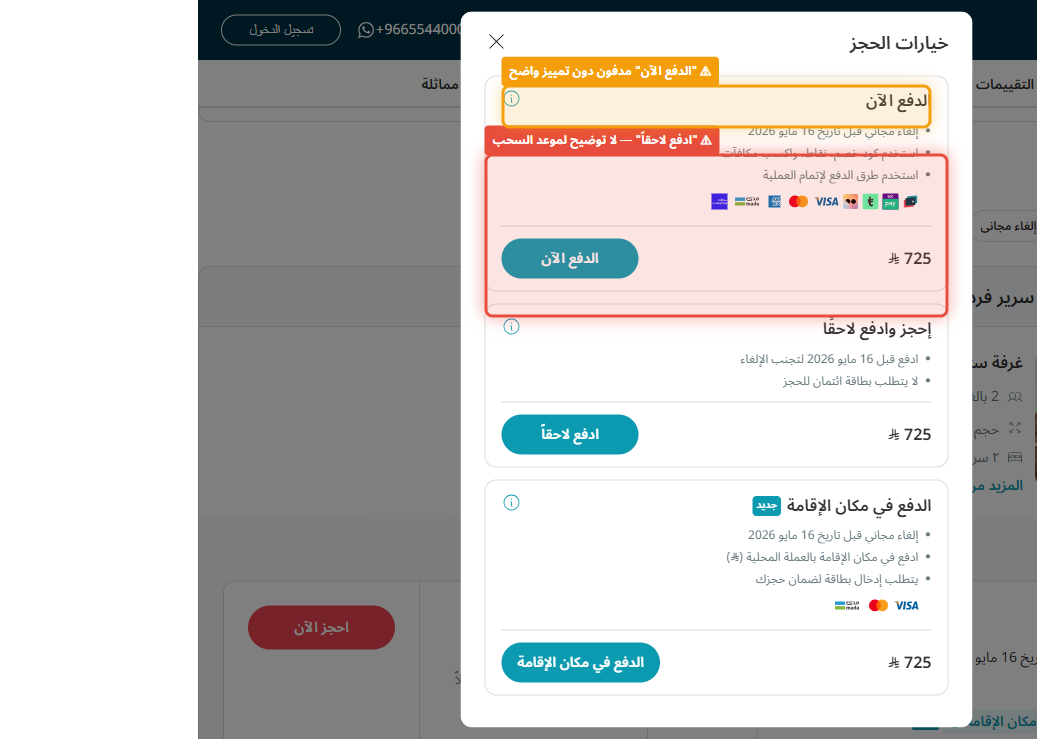
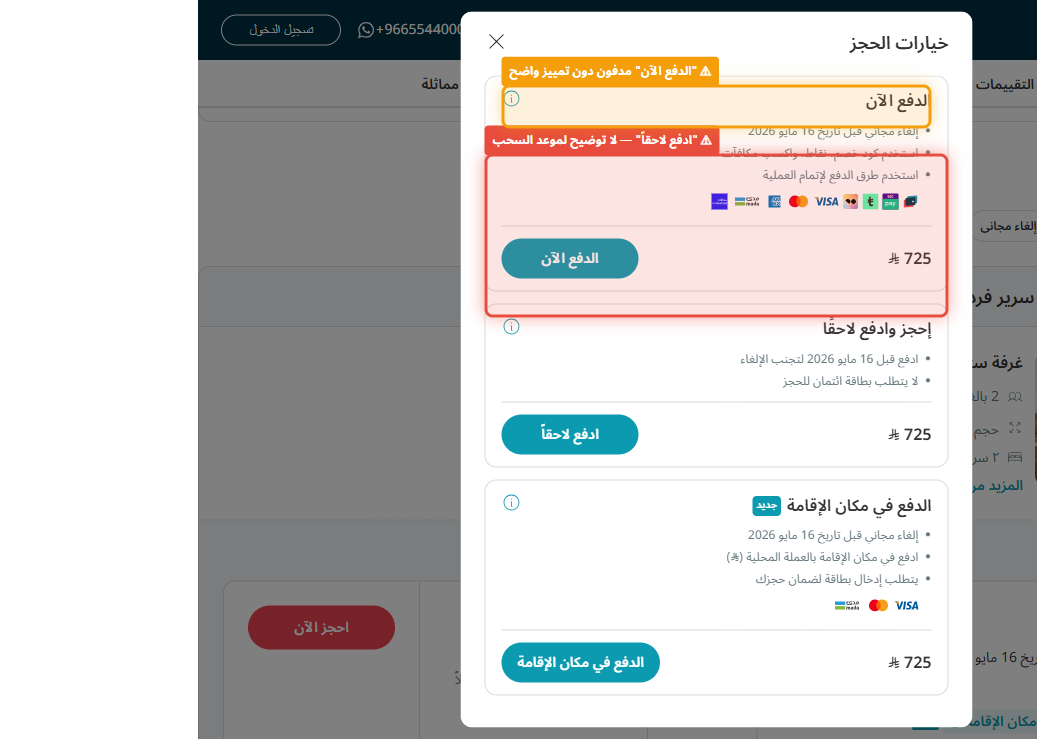
When a user selects the "Pay Later" (الدفع لاحقاً) option on the checkout page, the interface presents a simple toggle or radio button with no accompanying explanation of the financial mechanics. The user is not told: (1) whether a credit card pre-authorization hold will be placed immediately, (2) the exact date the charge will be executed, (3) the cut-off time to cancel without charge, or (4) what happens if the card on file is declined at charge time.
In the RTL layout at 1440px, the payment options panel occupies the right-center of the viewport. The "Pay Later" radio button is visually indistinguishable from "Pay Now" — same size, same weight — with only a small label difference in Arabic. For a high-value hotel booking (potentially SAR 1,000–5,000+), this opacity is a significant trust barrier and potential source of financial surprise.
Recommendation
Immediately below the "Pay Later" radio button, add an inline information box (styled distinctively with a brand teal left border) that states: "سيتم تأكيد حجزك الآن. لن يتم خصم المبلغ من بطاقتك إلا في [التاريخ المحدد]. يمكنك الإلغاء مجاناً حتى [deadline]." Include the exact charge date dynamically pulled from the hotel's policy. Also add a small 🔒 icon with a tooltip explaining the pre-authorization hold amount and duration. This is a copy + CSS-only change — zero back-end work required.
Cancellation Policy Collapsed & Legally Dense on Room Cards
H6: Recognition Rather Than RecallDescription
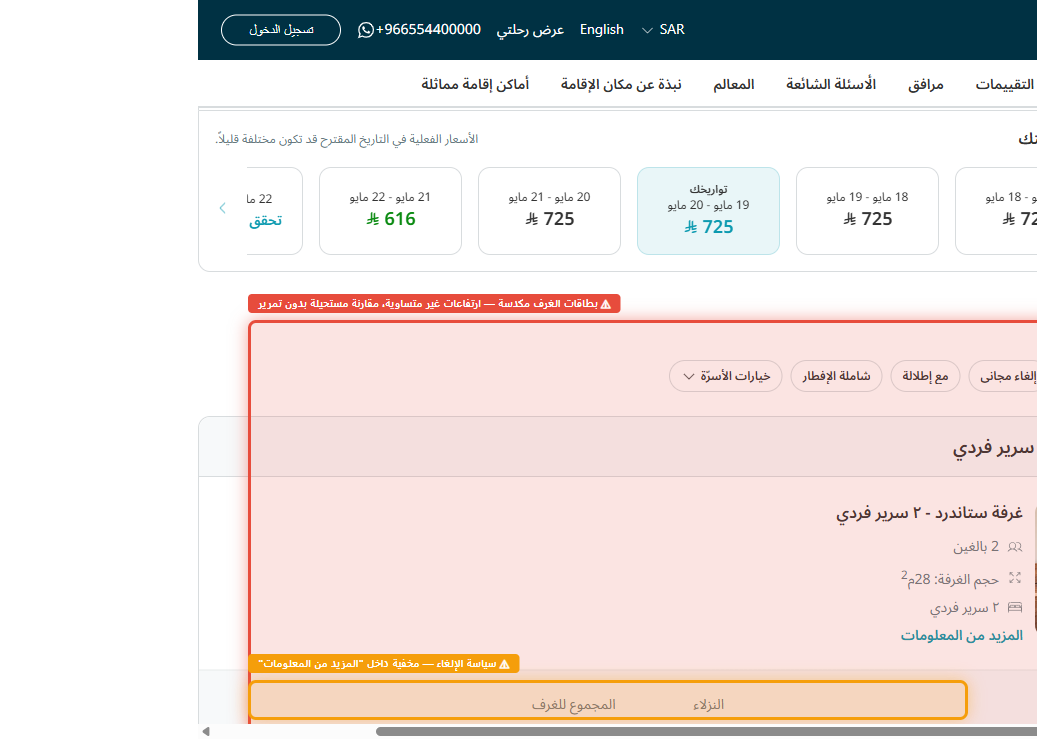
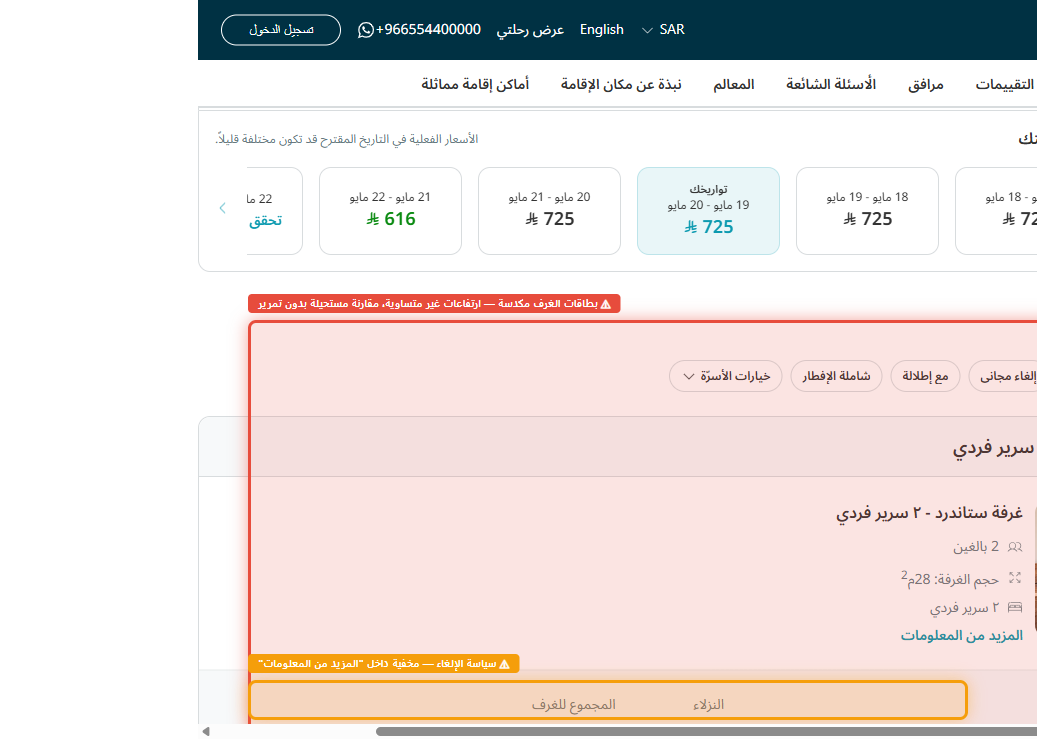
On the room selection page, each room card displays key attributes (bed type, room size, meal plan) but the cancellation policy is hidden behind a collapsed accordion or a small "See Details" text link. Users must actively expand this section — and once expanded, the policy is presented as dense legal text in Arabic (e.g., "سيتم خصم تكلفة ليلة واحدة في حال الإلغاء قبل أقل من 48 ساعة") without a clear visual summary of the key fact: the refundability deadline.
This forces users to read and remember cancellation terms for each room option across multiple cards — a high recall burden. In practice, users select rooms based on price and bed type, without realising they have chosen a fully non-refundable rate. The financial consequence (loss of 100% of the booking value) is discovered only at checkout or after booking.
Recommendation
Surface a one-line cancellation summary badge directly on every room card — always visible, never collapsed. Use a colour-coded label system: 🟢 Free cancellation until [date] (green badge), 🟡 Partial refund if cancelled before [date] (amber), 🔴 Non-refundable (red). Place this badge adjacent to the room price in the RTL card layout (leftmost position). A "Full Policy" link can still expand details for users who want them, but the critical decision signal must be always-on and scannable in under 2 seconds.
Tax & Fee Breakdown Hidden Until Checkout — Price Shock
H2: Match Between System and the Real WorldDescription
Throughout the room selection flow, room prices are displayed in Arabic as a per-night rate (e.g., "٤٥٠ ريال/ليلة"). This figure excludes Saudi VAT (15%), municipality fees, and the Almosafer service charge. The total-inclusive price only appears in the order summary panel on the left side of the checkout screen — after the user has already committed to a room and entered guest details.
The price delta can be 15–22% above the displayed rate, representing a significant and psychologically jarring "price shock" at the final payment step. In RTL cognitive flow, users reading right-to-left encounter the room price prominently on the right side of each card, while the true cost is revealed far downstream, on the left-side sidebar — a spatial and temporal disconnect that erodes trust and increases cart abandonment at the final step.
Recommendation
Display the total-inclusive price (per night and total stay) on every room card in the selection view. Below the main price, add a secondary line: "يشمل ضريبة القيمة المضافة والرسوم: ٥١٧ ريال/ليلة إجمالاً". Show the breakdown as a expandable tooltip: base rate + VAT (15%) + municipality fee + service charge = total. The order summary panel on the left should mirror this breakdown with a clear line-item format. This requires a pricing API update to pass tax-inclusive figures to the room card renderer.
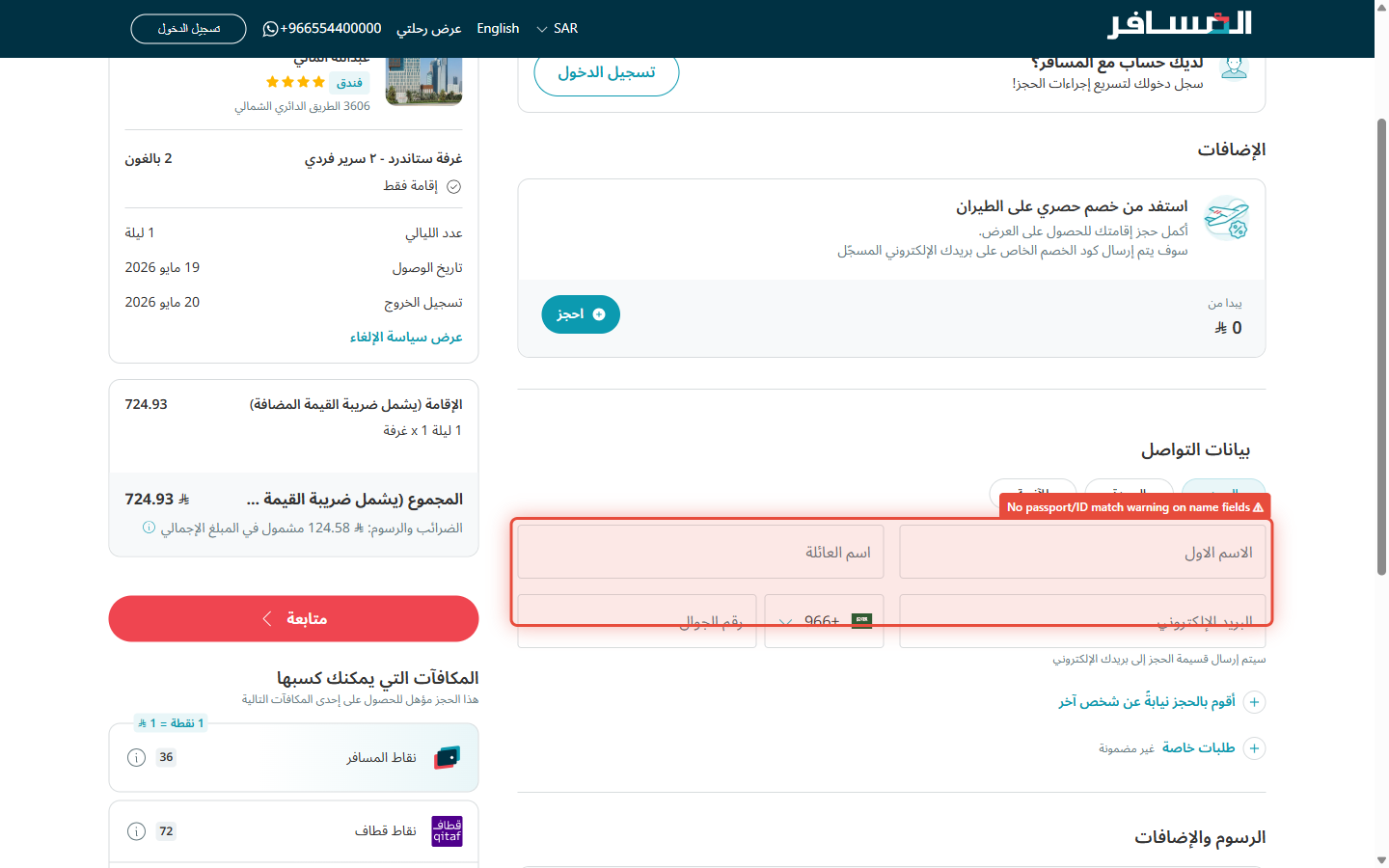
Guest Name Fields Lack Passport-Match Warning
H5: Error PreventionDescription
The guest details form on the booking page includes First Name (الاسم الأول) and Last Name (اسم العائلة) input fields, but provides no guidance that the names entered must exactly match the guest's official ID or passport. There is no inline hint text, no tooltip, and no validation rule that flags a potential mismatch before form submission.
In the Saudi context, names often have transliterations (e.g., "محمد" can be "Mohammed", "Mohamed", "Muhammad" in Latin script), and the family name (نسب) structure can differ from what appears on different ID documents. A mismatch can result in denial of check-in — a severe outcome for an international booking already paid in full. The RTL form layout places the First Name field on the right side of the viewport; no contextual hint appears near either field.
Recommendation
Add a persistent inline helper text beneath the Name fields reading: "تأكد من أن الاسم يطابق جواز السفر أو الهوية الوطنية بالضبط" (Ensure the name exactly matches your passport or national ID). Add a real-time character check that flags if the name contains Arabic characters when Latin is required (or vice versa for international guests). For Saudi nationals, display a sample format: "الاسم كما يظهر في الهوية: [نموذج]". This is a front-end only change — no back-end work needed.
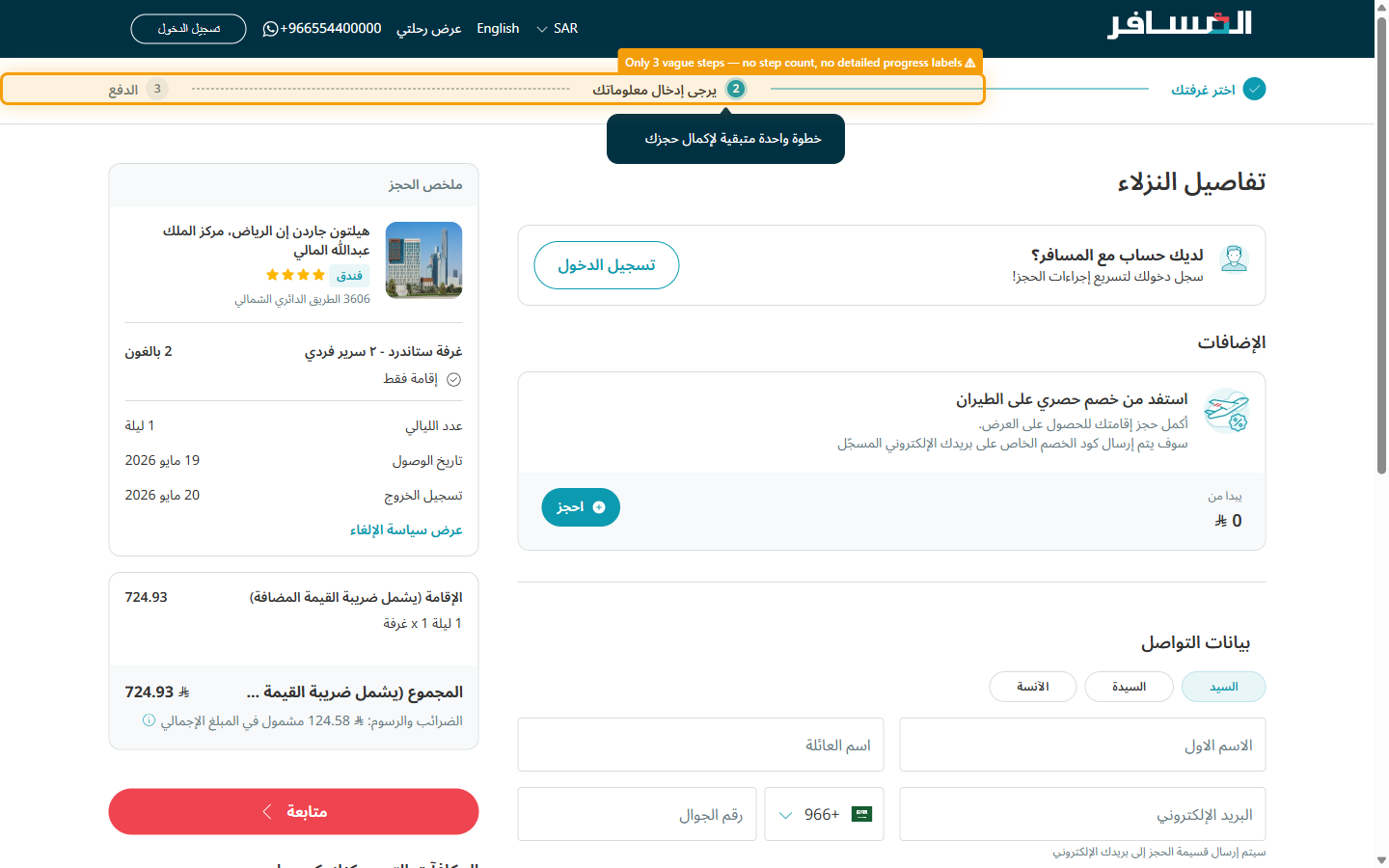
No Booking Step Progress Indicator Across 4-Step Flow
H1: Visibility of System StatusDescription
The hotel booking flow on Almosafer spans at least four distinct steps: (1) Room Selection, (2) Guest Details, (3) Payment & Review, (4) Booking Confirmation. However, no persistent progress indicator — no stepper, no breadcrumb, no step count (e.g., "Step 2 of 4") — is displayed anywhere on the page.
At 1440px, the top of the page is occupied by the site header and a hotel title bar, but the booking progress is entirely absent. Users who arrive at the Guest Details step have no way to know how many more steps remain before confirmation, how far they can go back, or what information they'll need to prepare (e.g., "I need my credit card for Step 3"). This is particularly anxiety-inducing for first-time Almosafer users who are unfamiliar with the flow.
Recommendation
Implement a horizontal step progress bar pinned just below the sticky site header, spanning the full content width. Design: four labeled steps in Arabic (اختيار الغرفة → بيانات النزيل → الدفع → التأكيد), with the current step highlighted in brand teal, completed steps shown with a checkmark icon, and upcoming steps in muted gray. The active step label should be bold. This is a pure front-end UI component with no back-end dependency — implementable in one sprint.
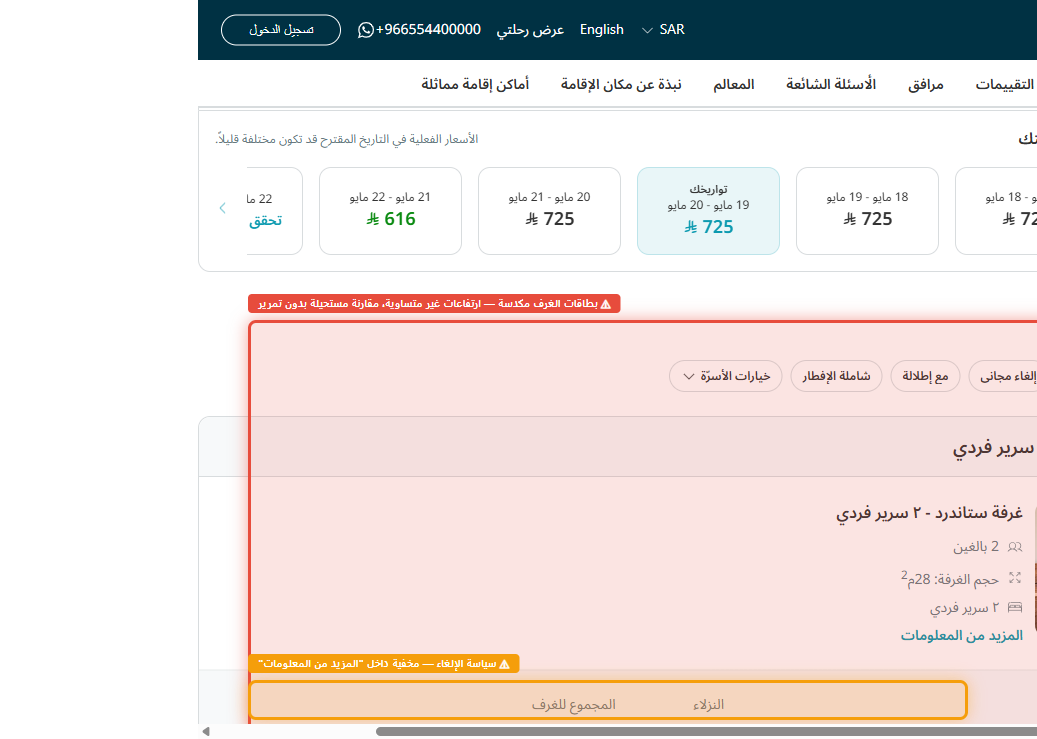
Room Cards Impossible to Compare Without Extensive Scrolling
H8: Aesthetic and Minimalist DesignDescription
The room selection page stacks all room type cards vertically in a single-column list on the right side of the 1440px viewport. Each card has a different height due to inconsistent content density — some show photos, some do not; some list 5 amenities, others list 2. The order summary sidebar on the left remains static while the user scrolls through many room options.
A user comparing "Standard Double Room" vs. "Deluxe King Room" must scroll up and down to reference both cards simultaneously — an impossible comparison task given they can't see both at once. Key differentiators (price per night, room size in sqm, view type, bed configuration, included meals) are not consistently positioned within each card, forcing users to scan each card entirely rather than using a predictable information hierarchy.
Recommendation
Redesign room cards with a fixed-height, grid-friendly card structure where all key attributes appear in the same position on every card: (1) room photo (top, fixed-aspect), (2) room name + size in sqm, (3) bed type icon + occupancy, (4) meal plan badge (breakfast included / room only), (5) cancellation badge (colour-coded), (6) price (total + per-night breakdown), (7) "Select" CTA button. Add a "Compare" checkbox to any 2–3 cards, triggering a sticky comparison drawer at the bottom of the viewport showing all selected rooms side-by-side in a table format. This requires a medium front-end effort: card component redesign + comparison state management.
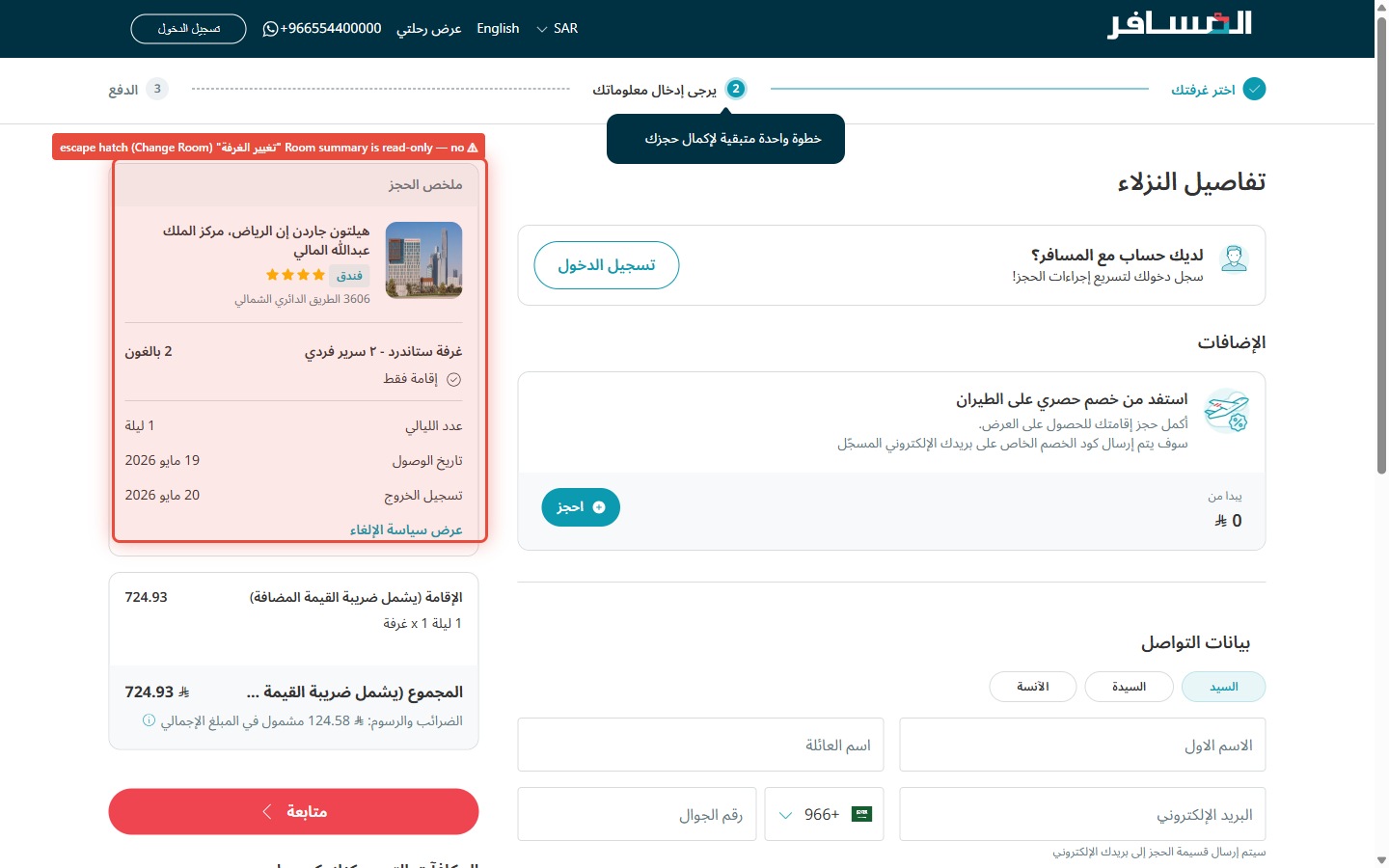
No "Edit Room" Escape Hatch After Reaching Guest Details
H3: User Control and FreedomDescription
Once a user proceeds from room selection to the guest details step, the chosen room appears in the left-side order summary sidebar as a static, read-only display (room name, dates, number of guests). There is no visible "Edit" or "Change Room" control within the sidebar. The only way to change the room is to use the browser's Back button — which on some browsers clears the form fields already entered, or triggers a page reload that resets the session.
In RTL reading flow, a user's eye naturally falls on the left sidebar first (as it is the visual "end" destination in RTL). Seeing their room summary and wanting to change it — but finding no interactive affordance — creates a "trapped" sensation that significantly increases abandonment at this late, high-intent stage of the booking funnel.
Recommendation
Add a small, clearly labelled "تغيير الغرفة" (Change Room) link or icon button adjacent to the room name in the order summary sidebar. Clicking it should navigate the user back to the room selection page while preserving any already-entered guest detail data in session storage — so no work is lost. Additionally, show a subtle confirmation modal: "هل تريد تغيير الغرفة؟ لن تفقد بيانات النزيل المدخلة." This is a low-effort change: one link + session-storage persist logic.
"Confirm Booking" CTA Below the Fold — No Sticky Summary
H7: Flexibility and Efficiency of UseDescription
The primary "Confirm Booking" (تأكيد الحجز) call-to-action button exists only at the very bottom of the payment page — below the guest details section, below the payment method selection, and below the terms & conditions checkbox. On a standard 1440×900 desktop viewport, the CTA is never visible without scrolling, regardless of screen size.
In an RTL layout, the order summary sidebar on the left side of the viewport stops scrolling at its natural end, leaving a large blank white area in the left column while the user scrolls down the right side of the form. This creates a visually unbalanced page where the primary action (confirming a potentially SAR 5,000+ booking) is hidden at the bottom with no persistent access point. Power users who have already reviewed all details must scroll all the way down to execute their decision — a friction that disproportionately affects users who are confident and ready to confirm quickly.
Recommendation
Make the order summary sidebar sticky and include the "Confirm Booking" button at the bottom of the sticky sidebar. As the user scrolls through the right-side form, the left sidebar — containing the room summary, total price (tax-inclusive), and the primary CTA — remains always visible. The button should be full-width within the sidebar, styled in Almosafer brand teal with the booking total: "تأكيد الحجز — ٢٬١٥٠ ريال". This is a CSS-only sticky positioning change with minimal JavaScript for scroll synchronisation — low effort, immediate conversion uplift.